Database setup and AIS ingestion
End-to-end guide for getting from “nothing” to “OMRAT querying real AIS
linestring segments out of PostGIS.” If you only have a project
.omrat file and no AIS database, read this chapter first — every
Update AIS / Update all distributions button in OMRAT reads from
the database described here.
Architecture in one paragraph
OMRAT’s risk calculations consume constant-COG/SOG linestring
segments out of PostGIS — one row per (MMSI, time-window,
course/speed). Those rows are produced by feeding raw AIS pings
through the TDKC compression algorithm (Guo et al. 2024) implemented
in the AISsegments sister
package.
The full pipeline:
raw AIS files (NMEA / CSV)
     |
     v   aisdb.decode_msgs()
per-vessel point streams (temp SQLite)
     |
     v   aissegments.tdkc_segments()
constant-COG/SOG linestring segments
     |
     v   psycopg2 + PostGIS bulk insert
{schema}.segments_YYYY_M  +  {schema}.statics_YYYY  +  {schema}.states_YYYY
     |
     v   omrat_utils.handle_ais.run_sql()
risk-analysis queries
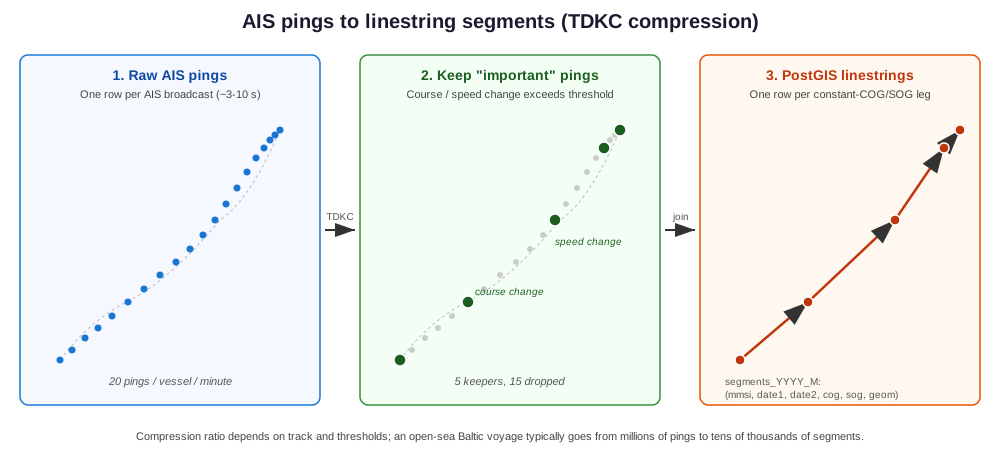
How TDKC compression turns dense per-vessel pings into the constant-COG/SOG linestring segments OMRAT actually queries. The middle panel keeps only the pings where course or speed changes meaningfully (see Threshold tuning); the right panel chains the kept pings into one PostGIS row per “leg” of the voyage.
1. Stand up the database
The easiest path on a developer machine is the bundled Docker stack
(docker/ in the repository).
cd <OMRAT repo root>
cp docker/env.example docker/.env       # edit credentials if you want
docker compose -f docker/docker-compose.yml up -d
That gives you localhost:5432 with PostGIS 3.4 enabled, running as
user omrat / database omrat.
For a remote or institutional database, just enable PostGIS and create a
role with CREATE privileges on the database — see the wizard’s
Database capabilities page for what it checks.
2. Install OMRAT’s Python dependencies
OMRAT’s requirements.txt lists
aissegments and
aisdb alongside the existing
dependencies. QGIS plugin loads pull these in via qpip (configured
in metadata.txt).
For development outside QGIS:
pip install aissegments aisdb
Supported AIS file formats
The ingestion pipeline auto-classifies each input file by extension plus a header sniff and routes it to the right decoder:
File pattern |
Header signature |
Routed to |
Static AIS data? |
|---|---|---|---|
|
(binary NMEA) |
|
✓ from Type-5 messages |
|
aisdb’s own CSV dump |
|
✓ |
|
generic AIS CSV |
|
✓ when static columns are present (Length/Width/Draft/IMO/…) |
|
generic AIS columns ( |
|
✓ when static columns are present (Ship type/A/B/C/D/Draught/…) |
For the simple-CSV path (Marine Cadastre and similar), AISsegments
recognises a wide range of column-name aliases — BaseDateTime /
timestamp / time, LAT / latitude / lat, LON /
longitude / lon, etc. — and parses ISO 8601 timestamps as well
as Unix seconds.
If the CSV also carries vessel-info columns (Marine Cadastre’s
VesselName / IMO / CallSign / VesselType / Length /
Width / Draft), the pipeline extracts them via
aissegments.read_csv_static_records() and populates statics_YYYY
and states_YYYY accordingly. Length and Width get split half/half
into AISdb’s per-quadrant antenna offsets (dim_a = dim_b =
Length/2 and dim_c = dim_d = Width/2 — a centred-antenna
approximation).
If the CSV is bare (just mmsi / time / lon / lat /
sog / cog), the identity and voyage fields land as NULL
placeholders. Downstream AIS queries derive vessel length and beam
directly from the AIS Type-5 dimensions (loa = dim_a + dim_b,
beam = dim_c + dim_d); ship-type classification uses the AIS
type_and_cargo field. Air-draught distributions stay empty unless
you supply a richer vessel registry of your own and reinstate a JOIN in
omrat_utils/handle_ais.py.
The Parquet path (requires the optional pyarrow package) is
built for the Danish Maritime Authority’s monthly aisdk dumps but
accepts the same column aliases as the CSV reader.
Warning
On OSGeo4W/Windows, QGIS loads its own arrow.dll (the
arrow-cpp package) into the process before any plugin runs, and
Windows resolves DLLs by base name — so the installed pyarrow
version must match OSGeo4W’s arrow-cpp version or the import fails
with “DLL load failed: The specified procedure could not be
found”. Check the bundled version in
C:\OSGeo4W\etc\setup\installed.db (search for arrow-cpp)
and install the matching wheel, e.g. pip install pyarrow==25.0.0
into the OSGeo4W Python. The ingestion log shows this exact advice
when the mismatch is detected.
Details that differ from the CSV path:
Files are streamed one at a time in name order (chronological for
*-YYYY-MMmonthly dumps) instead of merged in memory — a single DMA month is ~135M pings, so a whole year cannot be held at once. Pings are read in compact dtypes; expect a few GB of RAM per month file, not tens.Rows whose
Type of mobileis not Class A or Class B (base stations, AtoN) are dropped.DMA’s decoded ship-type names (
Cargo,Tanker, …) are mapped back to numeric AIStype_and_cargocodes;Undefinedstays NULL and lands in OMRAT’s “Other Type” category.The per-quadrant antenna offsets
A/B/C/Dare used directly fordim_a–dim_dwhen present (halved Length/Width is the fallback), and timestamps in DMA’s day-firstdd/mm/yyyy HH:MM:SSlayout are recognised alongside ISO 8601 and unix seconds.
3. Walk the wizard
Open QGIS, load the OMRAT plugin, then Settings → Database setup wizard…. The wizard has five pages:
Intro — quick orientation; offers a button to open the Docker quickstart (
docker/README.md).Connection — host / port / db / user / password / schema / sslmode. Click Test connection. Once a probe succeeds the Next button activates.
Database capabilities — runs
DbProbeand lists what’s in place vs. what’s missing. Buttons:Enable PostGIS (only if the user is superuser; otherwise displays the SQL for a DBA to run).
Apply OMRAT schema migrations — creates
omrat_meta(version table + ingestion watermark) and the AIS schema you configured.Create year-partitioned tables for
<year>— provisionsstatics_YYYY,states_YYYY, and the 12 monthly partitions ofsegments_YYYY.
Ingest AIS data (optional) — the ingestion page:
Pick AIS files (NMEA
.nm4, aisdb.csv, gzipped variants, or.parquetdumps).Set
min_sed_m(default 30 m) andmin_svd_kn(default 0.3 kn) — these are the OMRAT-tuned TDKC threshold floors.Set the target year and a source label.
Click Run ingestion. The job runs on a
QThread; progress messages stream into the log view. Per-MMSI: insert onestatics_YYYYrow, onestates_YYYYrow, and a batch ofsegments_YYYY_Mlinestring rows fromtdkc_segments(...).
Done — saves the connection profile and ingestion settings to QSettings (
omrat/db_profiles/default/*andomrat/ingest_profiles/default/*). The legacy flat keys read byomrat_utils/handle_ais.pyare mirrored automatically, so existing AIS-traffic queries pick up the new credentials transparently.
4. Verify with a smoke test
After the wizard finishes you can run a one-shot end-to-end check by
pointing OMRAT at a small fixture. AISdb’s bundled
test_data_20210701.csv is the easiest:
from pathlib import Path
import aisdb

from omrat_utils.db_setup import (
    ConnectionProfile, IngestionSettings, Migrator,
)
from omrat_utils.handle_ais_ingest import IngestionPipeline

profile = ConnectionProfile.from_qsettings()
settings = IngestionSettings.from_qsettings(profile.name)

# Make sure the year tables exist for the dataset's date range.
Migrator(profile).apply_pending()
Migrator(profile).ensure_year_partition(2021)

aisdb_csv = (
    Path(aisdb.__file__).parent / "tests" / "testdata"
    / "test_data_20210701.csv"
)
result = IngestionPipeline(profile, settings).run([aisdb_csv], year=2021)
print(result.summary())
Then in psql:
SELECT count(*) FROM omrat.segments_2021;
SELECT count(*) FROM omrat.statics_2021;
SELECT count(*) FROM omrat_meta.segment_watermark;
You should see non-zero counts in all three.
5. Run risk analysis as before
Once the segments table is populated, omrat_utils.handle_ais.run_sql
queries {schema}.segments_{year}_{month} exactly as it always did —
the schema layout is intentionally compatible. The AIS connection
settings menu in OMRAT’s main dialog reads from the same QSettings
keys the wizard saved, so traffic-fetching for legs and segments works
without any additional config.
See User Guide (“Importing from AIS” section) for the plugin-side workflow once the database is populated.
Custom ship type mapping (IMO / MMSI)
The AIS Type-5 type_and_cargo code is often missing or wrong. When
a study needs specific hulls in specific OMRAT categories, keep a small
mapping table in the AIS database and manage it from Settings ->
Ship type mapping… (it uses the connection from AIS connection
settings):
column |
type |
meaning |
|---|---|---|
|
bigint |
MMSI to match (nullable) |
|
bigint |
IMO number to match (nullable) |
|
smallint |
OMRAT category index 0-20 (0 Fishing … 17 Passenger, 18 Cargo, 19 Tanker, 20 Other) |
|
text |
free text, ignored by OMRAT |
You choose the schema; the table defaults to ship_type_map.
Import CSV… creates the table when it does not exist and replaces
its contents from a ; / , / tab separated file with an mmsi
and/or imo column plus a ship_type column. The type cell may
hold the index, an AIS type code (30-89, converted with the same rule
as the passage query) or a category name (Tanker, Cargo,
ferry, hsc, …). Rows that cannot be read are listed and
skipped. Export CSV… writes the table back out (with a
ship_type_name column for readability) so it can be edited and
re-imported, and the dialog previews the first 1000 rows.
Resolution order per passing ship: IMO match -> MMSI match ->
external vessel lookup ship type column -> broadcast AIS code. The
IMO join needs imo_num in statics_<year>; databases built by
the ingestion wizard have it, on others OMRAT probes
information_schema once and joins on MMSI only. Duplicate keys in
the mapping table never multiply pings (DISTINCT ON in both
lookups). Junction passage counting reads only MMSI, route_id,
time and COG, so the mapping does not affect it. Legs already fetched
keep their categories until you run Update AIS / Update all
distributions again.
Database schema reference
The schema matches OMRAT’s legacy (sjfv) layout used by
omrat_utils/handle_ais.py. Two metadata tables in omrat_meta
plus a year-partitioned trio in the user-configured schema:
omrat_meta.schema_version       (version PK, name, applied_at)
omrat_meta.segment_watermark    (mmsi PK, last_t, last_run_at, n_segments)

{schema}.statics_YYYY            <- per-vessel IDENTITY (changes ~never)
   rowid  bigserial PK
   mmsi   bigint
   date   timestamptz          (when this identity row was reported)
   dim_a  smallint             (antenna->bow, m)
   dim_b  smallint             (antenna->stern)
   dim_c  smallint             (antenna->port)
   dim_d  smallint             (antenna->starboard)
   imo_num bigint

{schema}.states_YYYY             <- per-VOYAGE static data (changes per leg)
   rowid  bigserial PK
   mmsi   bigint
   date   timestamptz
   draught         double precision
   type_and_cargo  smallint
   eta             timestamptz   (NULL in v0.1; populated in v0.2)
   destination     varchar(20)
   static_id       bigint  -> statics_YYYY.rowid  ON DELETE SET NULL

{schema}.segments_YYYY           <- TDKC linestring rows
                                 (PARTITION BY RANGE date1)
   rowid    bigserial
   mmsi     bigint
   date1    timestamptz NOT NULL  (segment start; partition key)
   date2    timestamptz           (segment end)
   segment  geometry(LineString, 4326)
   cog      smallint              (mean course, [0, 359])
   sog      double precision      (mean speed, knots)
   route_id bigint                (NULL on initial ingestion)
   state_id bigint                (logical link to states_YYYY.rowid)
   heading  smallint              (NULL on initial ingestion)
   PRIMARY KEY (rowid, date1)
     segments_YYYY_1   PARTITION OF segments_YYYY  for Jan
     segments_YYYY_2   PARTITION OF segments_YYYY  for Feb
     ... segments_YYYY_12  for Dec
Differences from the legacy schema:
Postgres declarative partitioning on
segments_YYYY(was a single yearly table or per-month UNION). Queries againstsegments_YYYY_Mcontinue to work;segments_YYYYnow also works thanks to partition pruning. The composite PK(rowid, date1)is a Postgres requirement for partitioned-table unique constraints —rowidalone is still unique by virtue ofbigserial.``segment`` is constrained to
geometry(LineString, 4326); legacy used the unconstrainedpublic.geometry. The constraint catches insert errors but is invisible to existingST_Intersectsqueries.Foreign key ``states_YYYY.static_id`` → ``statics_YYYY.rowid`` is declared;
segments_YYYY.state_idis not a hard FK (FKs from a partitioned table get nuanced in older PG).
route_id identifies one port-to-port trip. OMRAT’s ingestion leaves
it NULL; it is filled by a separate route-tagging step. The junction
pass of Update all distributions reads it to pair a vessel’s
passage-line crossings into junction transits (How the AIS counts are made);
segments without a route_id are paired per MMSI within 2 h instead.
Static + state row deduplication
The pipeline does NOT insert a new statics_YYYY or states_YYYY
row when the data is identical to the most recent existing row for that
MMSI. Each ingestion path:
Pre-loads the latest
(mmsi, identity_tuple)pairs for statics and the latest(mmsi, voyage_tuple)pairs for states from the DB, in one query each (using PostgreSQL’sDISTINCT ON (mmsi)).For every track, computes the new identity / voyage tuple and compares to the cached one. Match → reuse the existing rowid, no INSERT. Mismatch → INSERT a new row and update the cache.
Identity tuple for statics_YYYY:
(dim_a, dim_b, dim_c, dim_d, imo_num).
Voyage tuple for states_YYYY:
(draught, type_and_cargo, destination, eta, static_id).
This means:
A vessel reported with the same dimensions across multiple ingestion runs gets one
statics_YYYYrow total.A vessel reporting the same draught + destination + ETA on every message gets one
states_YYYYrow.A draught change, destination change, ETA change, or new IMO triggers exactly one new row. Older segments still link to the older row; newer segments link to the newer one. This gives time-windowed static linking for free as voyage data evolves.
The summary line counts both inserts and reuses, e.g.:
Ingested 5 file(s) -> 1234 tracks, 24500 segments,
12 static, 145 state rows, reused 1222 static + 1089 state in 412.3s
ETA combination
The legacy schema’s states_YYYY.eta is a timestamptz. AIS
Type-5 static messages encode ETA as four separate fields
(eta_month, eta_day, eta_hour, eta_minute) with no year
— the year is implicit in the report. The pipeline combines them using
the ingestion target year as the year hint, with the AIS spec sentinels
(month=0, day=0, hour=24, minute=60) and invalid
calendar dates (Feb 30, etc.) all mapped to NULL.
ETA is part of the voyage tuple, so a voyage with the same draught and
destination but a corrected ETA still produces a new states_YYYY
row.
Incremental ingestion (re-runs are cheap)
Each successful per-MMSI insert updates
omrat_meta.segment_watermark with the latest AIS timestamp seen for
that vessel. On the next run (incremental=True, the wizard’s
default), the pipeline:
Reads the watermark table at the start of each ingestion path.
For every track it sees, drops any pings with
time <= last_tfor that MMSI before passing the track into TDKC.If nothing remains after the filter, the track is recorded under
n_tracks_skipped_watermarkand skipped silently.
This makes overlapping or repeated ingestions safely idempotent — point the wizard at the same files twice and the second run inserts zero new segments (you’ll see “… skipped (watermark)” in the summary).
To force a full re-ingest, uncheck Incremental in the wizard or pass
incremental=False to IngestionPipeline.run(...). Typically
you’d also TRUNCATE the relevant segments_YYYY_M partitions
first, otherwise you’ll duplicate rows.
Index strategy: build after bulk load
The segments_YYYY table can hold tens of millions of rows after a
single year of dense AIS data. Maintaining the GiST and btree indexes
during bulk INSERT slows ingestion by a factor of 5-10× — so the
migration that creates the tables deliberately leaves them unindexed
for segments_YYYY. Indexes on statics_YYYY and states_YYYY
(which hold thousands of rows, not millions) are created inline since
their maintenance cost is negligible.
After ingestion finishes, the pipeline runs
Migrator.create_year_indexes(year) once on the populated tables,
building:
Index |
Column(s) |
Used by |
|---|---|---|
|
GiST on |
|
|
|
Per-vessel time-window lookups |
|
|
JOIN to |
|
|
Downstream route-tagging queries |
The index step also runs ANALYZE on all three tables so the planner
picks the new indexes up immediately.
IngestionPipeline.run(...) does this automatically when finished
(create_indexes_after=True by default). If you ingest several
batches into the same year and want to delay indexing until the end,
pass create_indexes_after=False on every batch except the last.
Calling create_year_indexes(year) more than once is safe — every
CREATE uses IF NOT EXISTS.
Threshold tuning
TDKC keeps a ping whenever either of two measurements crosses its threshold floor:
min_sed_m— Synchronized Euclidean Distance. How far the ping is from where it would be at its timestamp on the straight line between the two adjacent kept pings. A large SED means the vessel is turning.min_svd_kn— Synchronized Velocity Difference. How different the ping’s reported speed-over-ground is from the speed implied by the same chord. A large SVD means the vessel is accelerating or decelerating.

What min_sed_m and min_svd_kn measure for one candidate
ping P2 between two adjacent kept pings P1 and P3.
The candidate is dropped only if both SED and SVD fall below
their thresholds — so a tight turn or a sudden speed change is
enough on its own to keep the ping.
min_sed_m and min_svd_kn are per-ingestion — they’re
settings, not constants. Edit them in the wizard’s Ingest page or
override programmatically:
settings = IngestionSettings(min_sed_m=10.0, min_svd_kn=0.1)
Sensible regimes:
Use case |
|
|
Effect |
|---|---|---|---|
OMRAT default |
30 m |
0.3 kn |
Risk-grade compression, filters AIS jitter. |
High-fidelity research |
5 m |
0.05 kn |
Preserves more detail, larger DB footprint. |
Long-term archive |
100 m |
1.0 kn |
Aggressive compression, ~order-of-magnitude smaller. |
Paper-faithful (Guo et al.) |
0 |
0 |
No floor; uses pure adaptive thresholds. |
See AISsegments docs/algorithm.md for the algorithm details and parameter visualisations.
Operational notes
Idempotent: re-running the wizard or
apply_pending()is safe. Schema migrations useIF NOT EXISTS; the migrator records its version inomrat_meta.schema_version.Watermark:
omrat_meta.segment_watermarkrecords the last AIS timestamp seen per MMSI. This is what the pipeline uses to skip already-ingested data on reruns.Threading: the ingestion worker uses
QThread; the UI stays responsive. Cancellation isn’t wired up yet — close the wizard or stop QGIS to abort.Batch commits: the worker commits every 200 tracks so a long run doesn’t sit in a single transaction the entire time.
Static-data caveat: in the v0.1 cut each MMSI gets one
statics_YYYYrow + onestates_YYYYrow per ingestion run. Vessels that change registration mid-period get a less precise mapping; the schema supports proper time-windowed linkage and a future iteration can populate it without changing the on-disk format.
Troubleshooting
- “PostGIS extension is missing”
Either run
CREATE EXTENSION postgis;as a DB superuser, or use the bundled Docker stack which preloads it.- “Year-partition tables missing”
The wizard’s Capabilities page has a year-spinbox + Create tables button. Or call
Migrator(profile).ensure_year_partition(year)programmatically.- Ingestion is slow
Expected; profiling and parallelisation are on the v0.2 roadmap. For one Baltic month (~10M points) on a developer laptop, expect tens of minutes. Bulk inserts already use
psycopg2.extras.execute_values; the next bottleneck will likely be TDKC itself, where Numba acceleration inside AISsegments is a clear candidate.- “AIS connection settings” menu shows defaults / blank fields
The wizard writes credentials under
omrat/db_profiles/default/*and also mirrors them to the legacy flat keys. If your install shows blanks, run the wizard once to seed both layouts.