Junctions and the transition matrix
A junction is any point where two or more legs share an endpoint. Today’s projects often have several – a Y where two routes converge, an X where two through-routes cross, a chain of straight legs sharing intermediate waypoints. How traffic splits at these junctions matters for collision risk: a 70%/30% split between two onward legs implies a very different collision pattern than a 50/50 one, and not every leg that touches a junction necessarily exchanges traffic with every other.
OMRAT models this with a per-junction transition matrix
where each row sums to 1.0. Rows are populated from one of three sources, in order of preference:
AIS-derived – when a database connection is configured, OMRAT counts matched transits through the junction (see How the AIS counts are made below) and normalises them per row. This is the most accurate source.
Geometry-derived – when AIS is unavailable, a fallback heuristic scores out-legs by their deflection angle from the inbound bearing (
exp(-deflection / 30 deg)) and normalises. Straight continuations get the highest share, hairpins the lowest.User-edited – entered or tweaked via Settings > Junction transition matrix…, marked
source="user", and preserved across subsequent Update all distributions runs.
How the AIS counts are made
Every AIS segment that crosses a leg’s passage line (the tangent line, the same line the traffic update samples) is one crossing. Its COG sorts it into the leg’s two directions with the same rule and maximum deviation as the traffic binning, which tells whether the ship was heading towards the junction (inbound) or away from it (outbound).
Crossings are then grouped into trips by (mmsi, route_id), where the
segments table’s route_id identifies one port-to-port trip. Within
a trip, sorted by time, an inbound crossing on leg i directly followed
by an outbound crossing on leg j is one transit i -> j:
every trip counts, so a ferry on 300 trips a year adds 300 transits;
a trip that passes the junction twice counts twice;
a U-turn (in and back out on the same leg) is not a transit.
Crossings that cannot be paired – a trip that starts or ends between
the passage line and the junction, or whose other crossing was not
observed – add nothing. Each row is normalised over its matched
transits, so they do not change the shares. After every junction pass
the QGIS log (OMRAT tab) reports, for each junction with three or
more legs, how many inbound crossings were matched and how many
crossings carried a route_id.
Segments without a route_id are paired per MMSI instead, and then
the two crossings must be at most 2 h apart. A row with no matched
transit keeps its geometric default.
How a transition matrix changes the calculation
Two ship-collision sub-models become matrix-aware:
Bend collisions
Today, bend collision frequency on a leg is computed from a single
bend_angle field plus the leg’s total traffic. When a junction
exists at the leg’s end and has a populated matrix, the model instead
iterates over each (this_leg -> other_leg) matrix row, computing
the deflection angle between inbound and outbound bearings and
weighting traffic by the matrix share. Pure-continuation pairs
(no deflection) drop out, and split-flow junctions naturally produce
multiple bend contributions.
If a leg has no junction at its end, or the junction has no matrix, the legacy single-bend path is used (no behaviour change).
Crossing / merging collisions
For each leg pair sharing a junction, the contribution to crossing / merging frequency is multiplied by a junction-aware conflict factor:
Reasoning: when 100% of leg 1 continues onto leg 2 and 100% of leg 2 continues onto leg 1, the only encounter at the junction is a head-on/overtaking exchange that the per-leg models already capture – the crossing/merging adjustment is 0. Any divergence (some traffic going elsewhere) re-introduces a junction-level conflict, hence the multiplicative complement. Defaults to 1.0 when no matrix is set.
Validating routes before computing
Pressing Update all distributions runs a route-validation pass before it touches AIS or the junction matrices. Two checks fire:
Close waypoints – distinct leg endpoints within 5% of the shortest incident leg’s length. The dialog zooms the canvas to the candidate and offers to snap to point 1, point 2, or the midpoint. The snap rewrites every leg endpoint matching either source coordinate to the chosen target.
Crossing legs (X-intersections) – two legs that geometrically cross at an interior point (not at a shared endpoint). The dialog asks whether to split each leg in two at the crossing point, producing four sub-legs that share a real junction node. Sub-legs inherit the parent leg’s traffic block.
Crossings are also caught where they are made: dragging a leg end on the map, or Connect in the Waypoint editor, so that a leg crosses others asks at once whether to split them, and Run model warns before a ship-ship collision run while unsplit crossings remain (Split and run / Run anyway / Cancel; pairs with a suppressed leg are ignored). This matters for the result: crossing collisions are only computed where legs share a waypoint, so an unsplit crossing counts as zero.
After the validation pass, the junction registry is rebuilt against the (possibly mutated) segment list, AIS update runs as before, and junction matrices are refreshed – AIS-derived where data are available, geometry-derived where not, and user-edited rows are left alone.
The Waypoint editor (Connecting and disconnecting legs (Waypoint editor)) changes which legs
meet at a junction. A detached leg end is kept further away than the
close-waypoint threshold, so this pass does not offer to join it again.
A hand-edited (user) matrix survives both edits: a leg that leaves
has its row and column dropped and the rows renormalised; a leg that
joins gets its geometric row and 0 % in the existing rows
(geometries.junctions.carry_user_matrices). An ais matrix
falls back to geometry because its leg set changed and must be counted
again.
Editing a matrix manually
Open Settings > Junction transition matrix… to inspect or edit the per-junction transition matrices. The editor also opens by itself after Update all distributions when at least one junction has three or more legs (merging, diverging or crossing traffic). It then starts on the first such junction, because those are the matrices worth checking after a fresh AIS count. If the editor is already open, it re-reads the rebuilt registry.
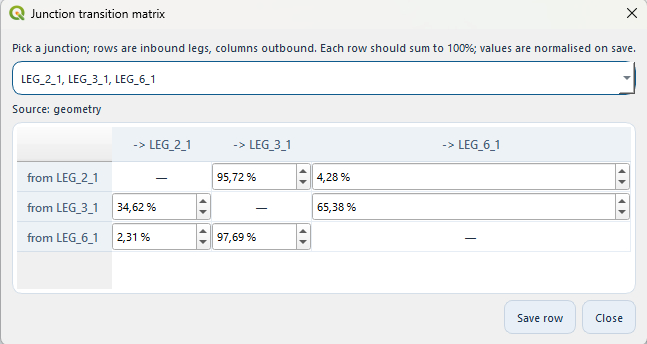
The Junction transition matrix dialog. The combo at the top picks
one junction (labelled with the LEG_{route}_{leg} names of
every leg meeting there); the Source label shows whether the
matrix came from AIS, geometry heuristics, or a user edit.
The picker combo lists every junction in the project; each entry is just the comma-separated leg names that meet at that point, so the grid headers below it use the matching names. The grid has rows for inbound legs and columns for outbound legs; the diagonal is fixed (a leg cannot transition to itself), and each cell is a percentage spinbox.
Click Save row to commit your edits for the currently displayed
junction. Values are normalised to sum to 1.0 on save (so you don’t
have to type exact percentages), and the junction’s source is
flipped to "user" so future Update all distributions runs leave
it alone.
JSON layout
The junctions block of a saved .omrat file is keyed by
junction id (a stable string derived from the coordinate, e.g.
"j_15.000000_55.000000"):
{
  "junctions": {
    "j_15.000000_55.000000": {
      "point": [15.0, 55.0],
      "legs":  {"1": "end", "2": "start", "3": "start"},
      "transitions": {
        "1": {"2": 0.7, "3": 0.3},
        "2": {"1": 1.0},
        "3": {"1": 1.0}
      },
      "source": "user"
    }
  }
}
Suppressed legs
A suppressed leg (Moving traffic to another route (suppressing legs)) keeps its place in the live
registry, so restoring it needs no rebuild and user or AIS matrices
survive. Only the calculation’s copy is changed
(compute.traffic_redirect.drop_legs_from_junctions()):
the leg’s row and column are removed and the remaining rows are renormalised;
a row whose whole share went to the suppressed leg falls back to the geometric default of the remaining legs;
a junction left with fewer than two legs disappears.
Behind the scenes
Pure-geometry route validation:
geometries/route_validation.py(close-waypoint detection, X-intersection detection, snap, split).Junction registry + matrix derivation:
geometries/junctions.py.Plugin handler (live registry + load/save):
omrat_utils/handle_junctions.py.Validation-pass UI driver:
omrat_utils/route_validation_ui.py.Matrix editor dialog:
omrat_utils/junction_matrix_dialog.py.Waypoint editor:
geometries/waypoints.py(detach_leg_end,attach_leg_end,detach_limits,attach_candidates),geometries/junctions.py:carry_user_matricesand the dialogomrat_utils/waypoint_editor_dialog.py.AIS-derived counts:
compute/junction_transitions.py(pure-Python trip pairing and normaliser) plusomrat_utils/handle_ais.py:fetch_passages_for_leg/compute_junction_transitions(database query and COG direction).